hexo引用图片无法显示

最近使用hexo,但是发现在文章中引用本地图片时总是显示不出来。

插件安装与配置

首先我们需要安装一个图片路径转换的插件,这个插件名字是hexo-asset-image

1
npm install hexo-asset-image --save

但是这个插件的内容需要修改,不然还是会出现图片无法显示的问题。

打开node_modules/hexo-asset-image/index.js,将内容更换为下面的代码

1
2
3
4
5
6
7
8
9
10
11
12
13
14
15
16
17
18
19
20
21
22
23
24
25
26
27
28
29
30
31
32
33
34
35
36
37
38
39
40
41
42
43
44
45
46
47
48
49
50
51
52
53
54
55
56
57
58
59
60
61
'use strict';
var cheerio = require('cheerio');


function getPosition(str, m, i) {
return str.split(m, i).join(m).length;
}

var version = String(hexo.version).split('.');
hexo.extend.filter.register('after_post_render', function(data){
var config = hexo.config;
if(config.post_asset_folder){
var link = data.permalink;
if(version.length > 0 && Number(version[0]) == 3)
var beginPos = getPosition(link, '/', 1) + 1;
else
var beginPos = getPosition(link, '/', 3) + 1;
// In hexo 3.1.1, the permalink of "about" page is like ".../about/index.html".
var endPos = link.lastIndexOf('/') + 1;
link = link.substring(beginPos, endPos);

var toprocess = ['excerpt', 'more', 'content'];
for(var i = 0; i < toprocess.length; i++){
var key = toprocess[i];

var $ = cheerio.load(data[key], {
ignoreWhitespace: false,
xmlMode: false,
lowerCaseTags: false,
decodeEntities: false
});

$('img').each(function(){
if ($(this).attr('src')){
// For windows style path, we replace '\' to '/'.
var src = $(this).attr('src').replace('\\', '/');
if(!/http[s]*.*|\/\/.*/.test(src) &&
!/^\s*\//.test(src)) {
// For "about" page, the first part of "src" can't be removed.
// In addition, to support multi-level local directory.
var linkArray = link.split('/').filter(function(elem){
return elem != '';
});
var srcArray = src.split('/').filter(function(elem){
return elem != '' && elem != '.';
});
if(srcArray.length > 1)
srcArray.shift();
src = srcArray.join('/');
$(this).attr('src', config.root + link + src);
console.info&&console.info("update link as:-->"+config.root + link + src);
}
}else{
console.info&&console.info("no src attr, skipped...");
console.info&&console.info($(this));
}
});
data[key] = $.html();
}
}
});

打开_config.yml文件,修改下述内容

1
2
post_asset_folder: true
url: <你的github page地址或者其他域名>

重新生成

修改后,新建博客
1
hexo new test

会发现在source/_posts目录中,新建了test.md与同名的文件夹(test)

重新生成html文件,看到输出
1
update link as:-->//<url>/2019/09/11/xxxx/1568192562650.png

访问即可看见图片出来啦!

jenkins

jenkins 安装

jdk安装
  1. 采用java8, 到官网下载jdk
  2. 解压配置, JAVA_HOME PATH,执行如下
1
2
3
4
[root@wpspic5 ~]# java -version 
openjdk version "1.8.0_161"
OpenJDK Runtime Environment (build 1.8.0_161-b14)
OpenJDK 64-Bit Server VM (build 25.161-b14, mixed mode)
Jenkins 安装
  1. 下载RPM包安装

jenkins安装也比较简单,有相应的rpm安装包

官网地址 选择合适的版本,下载安装

  1. yum安装

导入yum源

1
2
sudo wget -O /etc/yum.repos.d/jenkins.repo https://pkg.jenkins.io/redhat-stable/jenkins.repo
sudo rpm --import https://pkg.jenkins.io/redhat-stable/jenkins.io.key

安装

1
yum install jenkins

jenkins 配置

默认端口号是8080,直接访问,会进行一些初始化,及插件的安装

jenkins版本: 2.176.3-1.1

  1. 部署节点配置

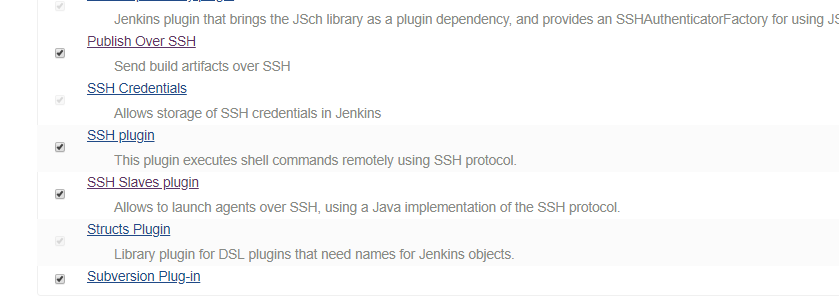
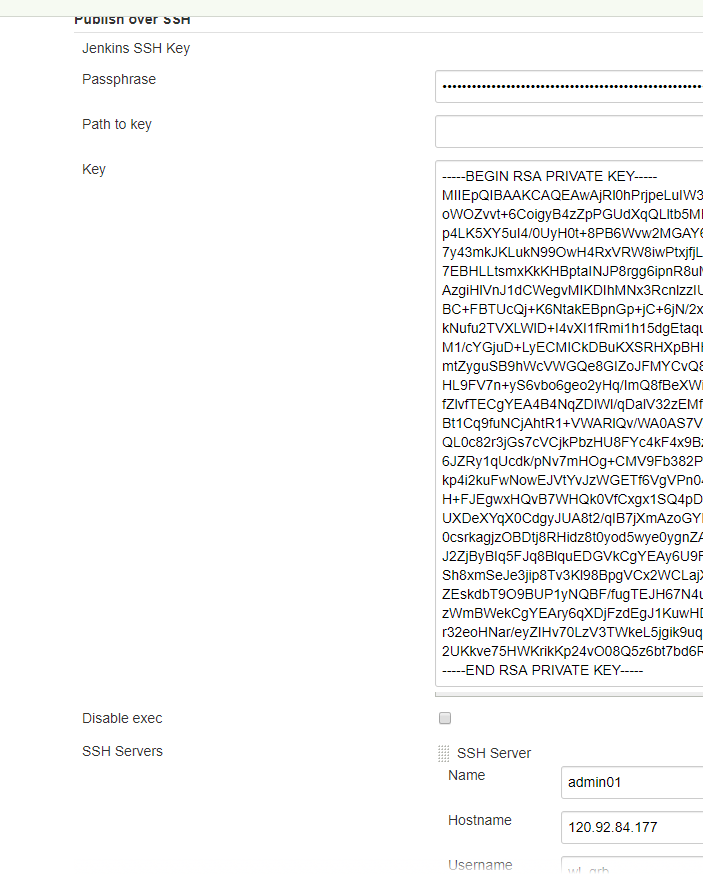
  • 进入jenkins主界面,点击左侧菜单的 “系统管理->系统设置”,拖动配置项到“Publish on ssh”

  • 新增登录主机的ssh private key/ password的登录信息

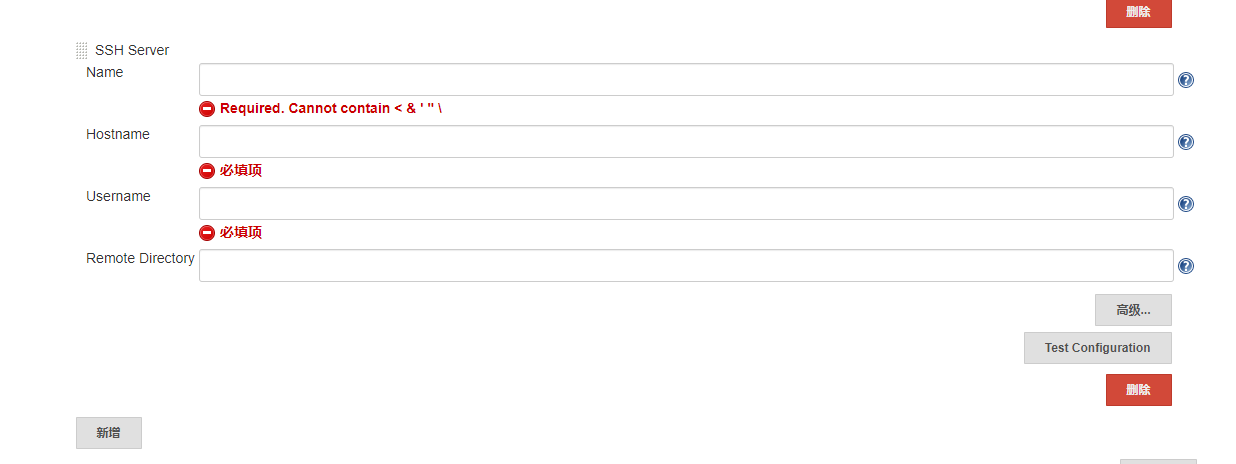
  • 增加节点,包括登录主机的用户名,IP地址,工作目录等, 可以新增多个节点

    • Name: 主机标识符,用于区分
    • Hostname: 主机ip地址
    • Username: 登录主机的用户名
    • Remote Directory: 远端工作目录
  1. 部署配置

  • 新建部署项,在主页左边栏,“新建任务“,起个有意义的名称,下面选择”自由风格的软件项目

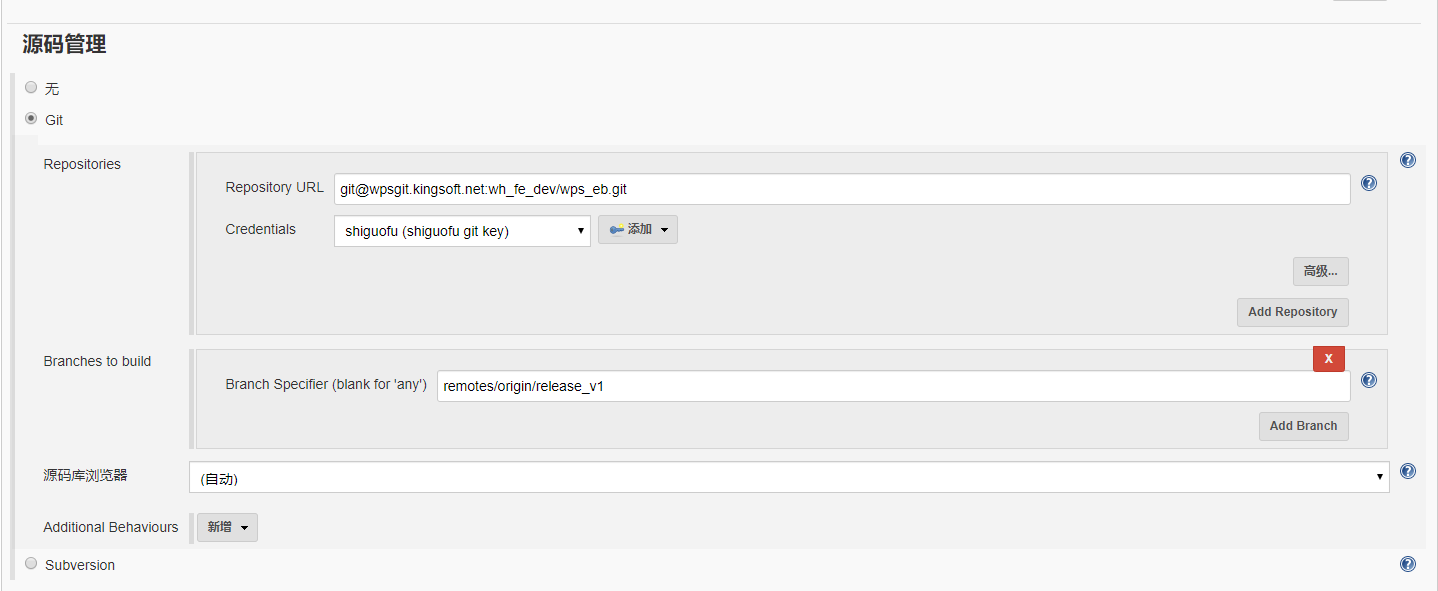
    找到源码管理,配置Git 的Repo/credit(获取代码的key), 分支;

    如果可以正常获取,不会出现提示

    否则会出现如下提示,检查repo的配置是否写错误;检查key是不是有权限拉取代码

  • 找到”构建“ 选项

    • 加入构建的命令,即打包操作(进入到工作目录,直接打包)
    1
    2
    3
    cd $WORKSPACE
    TAR_NAME=wps_eb_`date +%Y-%m-%d`.tar
    tar -cf $TAR_NAME ./
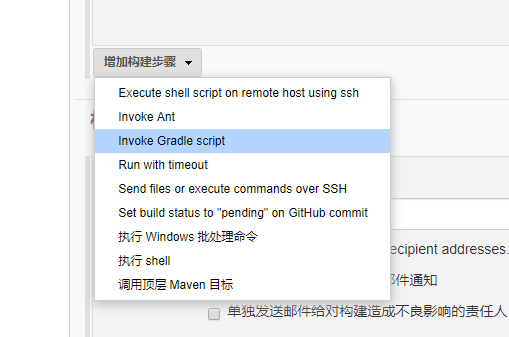
    • 增加构建步骤,选择 ”send files or execute commands over SSH“, 采用ssh发送项目文件到目标机器并执行命令部署
    • 增加发送到目标机器后的操作命令,依赖于项目文件 (release/project_init.sh)
    1
    2
    3
    4
    5
    6
    7
    8
    9
    file_name=wps_eb_`date +%Y-%m-%d`.tar
    tmp_dir=/tmp/wps_eb_tmp
    log_dir=/data/log/pm2/wps_eb-admin
    echo $file_name
    sudo rm -rf $tmp_dir
    sudo mkdir -p $tmp_dir
    sudo tar -xf /tmp/$file_name -C $tmp_dir ./release/*
    cd $tmp_dir/release
    sudo ./project_init.sh /tmp/$file_name

一些shell脚本

最近在搞部署项目的功能,写了不少shell脚本,总结一下

1. sftp上传支持多条命令,用awk分隔文件路径获取文件名称($NF表示最后一列)

1
2
3
4
5
6
7
8
9
10
11
12
13
14
15
16
17
18
19
20
21
22
#!/bin/bash                                                                                                                           
function check() {
if [ -z $1 ]; then
echo "please give the filename"
return
fi
if [ ! -f $1 ]; then
echo "file not exists, exit..."
return
fi
echo "ls" > command.txt
echo "cd bj6-c-grb-screen-admin01/史国富" >> command.txt
echo "put $1" >> command.txt
filename=`echo $1 | awk -F/ '{print $NF}'`
echo $filename
echo "ls $filename" >> command.txt
sftp -P 2222 shiguofu@120.92.118.51 < command.txt
echo "Done"
}


check $1

2. 部署项目,未增加测试环境标识(sed修改),手动修改文件

环境变量传入: 由于sudo 会重新初始化环境变量,因此,可以在脚本中传入执行的变量PATH等

1
2
3
4
5
6
7
8
9
10
11
12
13
14
15
16
17
18
19
20
21
22
23
24
25
26
27
28
29
30
31
32
33
34
35
36
37
38
39
40
41
42
43
44
45
46
47
48
49
50
51
52
53
54
55
56
57
58
59
60
61
62
63
64
65
66
67
68
69
70
71
72
73
74
75
76
77
WALLE_NODE=10.13.88.152
WALLE_USER=root
WALLE_PASSWD=1qaz@WSX
zip_file_name=wps_eb_admin_`date +%Y%m%d%H%M%S`.tar
remote_dest_dir=/tmp
TEST_NODE=10.226.50.22

function copy_to_walle()
{
echo "copy to $WALLE_NODE"
cd ..
echo "tar service files..."
tar -cf /tmp/$zip_file_name ./*
echo "Done. tar file -> /tmp/$zip_file_name"
sshpass -p "$WALLE_PASSWD" scp /tmp/$zip_file_name $WALLE_USER@$WALLE_NODE:$remote_dest_dir
echo "copy to remote Done."
sshpass -p "$WALLE_PASSWD" ssh $WALLE_USER@$WALLE_NODE "
rm -rf /tmp/wps_eb_tmp
mkdir -p /tmp/wps_eb_tmp
tar -xf /tmp/$zip_file_name -C /tmp/wps_eb_tmp
"
}

function deploy()
{
if [ -z $1 ]; then
echo "please give the ip address as the first param"
return
fi
USER=root
echo "deploy to test: $1"
echo "tar service files..."
tar -cf /tmp/$zip_file_name ./*
echo "Done. tar file -> /tmp/$zip_file_name"
if [ ! -z $2 ]; then
USER=$2
fi
if [ ! -z $3 ]; then
sshpass -p "$3" scp /tmp/$zip_file_name $USER@$1:$remote_dest_dir
sshpass -p "$3" ssh $USER@$1 << eeooff
sudo -i
tar -xf $remote_dest_dir/$zip_file_name -C /tmp/ ./release/*;
cd /tmp/release
PATH=$PATH:/usr/local/bin && ./project_init.sh $remote_dest_dir/$zip_file_name
eeooff
else
scp /tmp/$zip_file_name $USER@$1:$remote_dest_dir
echo "Done copy to remote host..."
ssh $USER@$1 << eeooff
sudo -i
tar -xf $remote_dest_dir/$zip_file_name -C /tmp/ ./release/*;
cd /tmp/release
. /etc/profile && ./project_init.sh $remote_dest_dir/$zip_file_name
eeooff
fi
rm /tmp/$zip_file_name
# ./project_init.sh $remote_dest_dir/$zip_file_name
}


function deploy_test()
{
cd ..
sed -i 's/production/development/g' pm2.json
deploy 10.226.50.22 root 123456
sed -i 's/development/production/g' pm2.json
}

echo $1
if [ -z $1 ]; then
deploy_test
elif [ "$1" == "walle" ]; then
copy_to_walle
else
cd ..
deploy $1 $2 $3
fi

3. 初始化服务环境,安装必要的包

1
2
3
4
5
6
7
8
9
10
11
12
13
14
15
16
17
18
19
20
21
22
23
24
25
26
27
28
29
30
31
32
33
34
35
36
37
38
39
40
41
42
43
#!/bin/bash                                                                                                                                                                    
SOFT_DIR=/data/soft

function install_webp(){
cd $SOFT_DIR
wget https://storage.googleapis.com/downloads.webmproject.org/releases/webp/libwebp-1.0.3-linux-x86-64.tar.gz
tar -xf libwebp-1.0.3-linux-x86-64.tar.gz
cd libwebp-1.0.3-linux-x86-64/bin
if [ -f /usr/bin/cwebp ]; then
mv /usr/bin/cwebp /usr/bin/cweb.bak
fi
cp cwebp /usr/bin/
}

function install_node(){
cd $SOFT_DIR
wget https://nodejs.org/dist/v10.13.0/node-v10.13.0-linux-x64.tar.xz
tar xvf node-v10.13.0-linux-x64.tar.xz
echo "export PATH=$PATH:$SOFT_DIR/node-v10.13.0-linux-x64/bin" >> /etc/profile
echo "export NODE_PATH=/data/soft/node-v10.13.0-linux-x64/lib/node_modules" >> /etc/profile
source /etc/profile
npm install pm2 -g
echo "10.13.0.29 wpsgit.xxx.net" >> /etc/hosts
echo "10.13.0.98 cdnshow.xxx.kingsoft.net" >> /etc/hosts
echo "120.92.115.93 suc.xxx.kingsoft.net" >> /etc/hosts
}
# mongodb 下载地址:https://repo.mongodb.org/yum/redhat/7/mongodb-org/3.4/x86_64/RPMS/

if [ ! -d $SOFT_DIR ];then
rm -rf $SOFT_DIR
mkdir -p $SOFT_DIR
fi
which cwebp # 采用which判断是否存在,获取返回值
code=`echo $?`
echo $code
if [ $code != 0 ]; then
install_webp
fi
which npm
code=`echo $?`
if [ $code != 0 ]; then
install_node
fi

4. 服务初始化脚本

服务需要sudo 执行, 增加了source 初始化环境的头

1
2
3
4
5
6
7
8
9
10
11
12
13
14
15
16
17
18
19
20
21
22
23
24
25
26
27
28
29
30
31
32
33
34
35
36
37
38
39
40
41
42
43
44
45
46
47
48
49
50
51
52
53
54
55
56
57
58
#!/bin/bash
source /etc/profile

function init()
{
if [ ! -z $1 ] && [ -d $1 ]; then
final_dir=$1;
else
echo "$1 did not exists... exit"
return
fi
echo "install package..."
cd $1
if [ ! -z $2 ]; then
sed -i "s/production/$2/g" pm2.json
fi
source /etc/profile
npm config set @wps:registry http://120.92.93.69:4873
npm install --no-save --production
npm install -g cnpm --registry=https://registry.npm.taobao.org
cnpm install canvas
echo "install Done."
echo "stop service sxxx-eb.."
sh -c 'source /etc/profile && pm2 delete wps_eb-admin' &>/tmp/pm2.log
echo "stopped"
sleep 1
echo "start service xxx-eb"
sh -c 'source /etc/profile && pm2 start pm2.json' &>/tmp/pm2.log
echo "start Done."
}


function deploy_by_tar()
{
release_dir=/data/www
dest_dir=/data/release/xxx_ebook_admin/`date +%Y%m%d-%H%M%S`
final_xxx_ebook_dir=$release_dir/xxx_ebook_admin
if [ ! -z $1 ] && [ -f $1 ]; then
echo "deploy with $1..."
zip_file_name=$1
else
echo "$1 did not exists... exit"
return
fi
mkdir -p $release_dir
mkdir -p $dest_dir
echo "untar package to $dest_dir"
`tar -xf $zip_file_name -C $dest_dir`
echo "untar Done."
echo "ln -sfn $dest_dir $final_xxx_ebook_dir"
ln -sfn $dest_dir $final_xxx_ebook_dir
echo 'Done.'
init $final_wps_ebook_dir $2
rm $zip_file_name
}

./init_env.sh
deploy_by_tar $1 $2

shell知识点.md

1. shell函数参数传递不需要在参数列表,是通过$1, $2….这样获取,如

1
2
3
4
5
6
7
8
9
10
11
12
#!/bin/bash

function deploy_one_host() # 函数定义,小括号不是必须的
{
cd wps_pic
zip_file_name=wps_pic_`date +%Y%m%d%H%M%S`.zip
zip "$zip_file_name" ./* -q
scp $zip_file_name root@$1:/tmp # 获取第一个参数
ssh root@$1 "sh exec.sh $zip_file_name;" # ssh 在远端执行命令,多个以分号分隔
}

deploy_one_host 10.229.26.143 # 传递一个参数,多个可在后面添加,以空格分隔

2. shell 命令行参数

1
2
3
#!/bin/bash

echo $1, $2 # 获取命令行参数,第一个第二个, 如果没有就为空

执行:

./exec.sh a b

3. if 判断

1
2
3
4
5
6
7
8
9
10
11
12
13
14
15
16
17
function check()
{
if [ ! -d "$release_name" ]; then
echo "$release_name"" not exists, check the online dir"
return
fi
if [ -z "$1" ]; then
echo "must give the dir"
return
elif [ ! -d "$1" ]; then
echo "$1" "not exists please give the dir will online"
return
else
echo "check ok"
do_online $1
fi
}

-d 判读是不是一个目录,如果是为真

-f 判断是不是一个普通文件,是为真

-z 判断字符的长度是不是为0,为0则为真

==/!= 字符串相等/不等